Creating content was a drag.
You were responsible for writing every word from scratch, designing every graphic by hand, and editing every video frame by frame — and you still had to find time to post content regularly across five different social platforms. Burnout was just part and parcel of the job.
Not anymore.
AI content tools have completely flipped the script. These are tools that can write, design, edit, schedule and even strategize — all in a fraction of the time skilled people once required. And the best part? You don’t have to be a tech savant to use them.
Whether you’re a solo blogger, small business owner, social media manager or full-time content creator, there’s an AI tool tailor-made for what you’re looking for.
This post guides you through 11 of the best AI content tools in the market today. For each one, you’ll learn what it does, who is most likely to benefit from using it, and why it’s worth trying.
By the end, you’ll know exactly which tools belong in your workflow — and how to use them together for optimal results.
Let’s jump in.
Why AI Content Tools Are No Longer Optional
A few years ago, AI tools were a kind of novelty. Fun to play with, but not really practical.
That’s changed fast.
These days, the best creators and brands are leveraging AI content tools to produce more high-quality content in less time. The ones who aren’t? They’re falling behind — slowly but surely.
Here’s a partial list of what AI tools can now handle on their own, or with very minimal human input:
| Content Task | Can AI Handle It? |
|---|---|
| Blogging and drafting | Yes |
| Social media captions | Yes |
| SEO keyword research | Yes |
| Image and graphic design | Yes |
| Video script writing | Yes |
| Voiceover creation | Yes |
| Email marketing copywriting | Yes |
| Content repurposing | Yes |
| Editing and proofreading | Yes |
| Hashtag and trend research | Yes |
That’s a ton of tasks you could be automating right now.
The trick is knowing which tool does what — and where you fit in. This is precisely what this guide breaks down.
Tool #1: ChatGPT — The Swiss Army Knife of AI Writing

If you’re aware of any AI content tool, it’s likely this one.
ChatGPT, by OpenAI, is one of the most versatile AI writing tools ever built. It can write blog posts, social media copy, email sequences, product descriptions, ad copy, scripts, and more.
What Makes ChatGPT Stand Out
Flexibility is ChatGPT’s greatest strength. It molds to just about whatever you throw at it.
Need a formal article? Done. Need a funny TikTok caption? Also done. Looking for a 10-email welcome series for your newsletter? Give it five minutes.
The trick to great results is writing detailed prompts. The more context you give it — your audience, your tone, what you want the writing to achieve — the better the output.
Best for: Bloggers, marketers, small business owners and social media managers
Pricing: Free plan available. ChatGPT Plus starts at $20/month
Tool #2: Jasper AI — Built Specifically for Marketers
ChatGPT is a generalist. Jasper is designed for exactly one thing: marketing content.
Jasper AI is trained on high-performing marketing copy. It knows how to write compelling headlines, CTAs that convert and ad copy that sells. It also comes with a hefty library of templates — more than 50 in all — for everything from Facebook ads to landing pages, product descriptions and blog posts.
Jasper’s Most Useful Features
One standout is Jasper’s Brand Voice feature. You can train it on your own content, and it will write in your authentic tone and style every time.
It also integrates with Surfer SEO, so it can actually help you write search-engine-optimized content as you write it — not after the fact.
Best for: Marketing teams, eCommerce brands, content agencies
Pricing: Starts at $39/month
Tool #3: Copy.ai — Fast, Clean, and Easy to Use
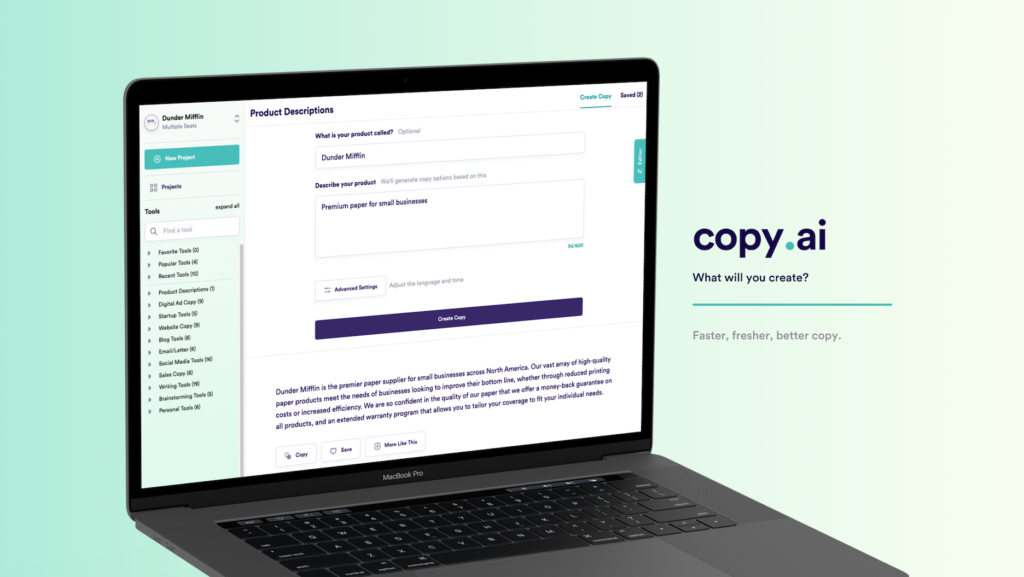
If Jasper feels overwhelming, Copy.ai is an ideal choice for beginners.
It’s clean, it’s simple and it yields great results fast. You select a template, fill in some details and Copy.ai produces different versions of your content in no time.
Where Copy.ai Really Shines
Copy.ai is perfect for short-form content. Social media posts, email subject lines, product descriptions, taglines — it handles all of these quickly and well.
It also boasts a robust free plan, making it one of the best entry points for beginners into the world of AI content tools.
Best for: Freelancers, startups, those just getting started with AI content tools
Pricing: Free plan available. Pro plan starts at $36/month
Tool #4: Surfer SEO — Write Content That Actually Ranks on Google
Great content is only half the battle. If nobody can find it on Google, what’s the point?
Surfer SEO is an AI content tool built specifically to help your content rank in search engines. It scans the top results for a given keyword and shows you exactly what you need to write to match — or beat — those pages.
How Surfer SEO Works in Practice
You type in your keyword. Surfer pulls up a content editor with a real-time SEO score. As you write, it suggests which terms to add, how long your content should be, and how to structure your headings.
It removes much of the guesswork from SEO.
| Feature | Benefit |
|---|---|
| Content Editor | Real-time SEO scoring as you write |
| SERP Analyzer | Find out what’s working for top-ranked pages |
| Keyword Research | Discover related terms to broaden semantic depth |
| Audit Tool | Fix older content to improve its rankings |
Best for: Bloggers, SEO agencies and content writers targeting organic traffic
Pricing: Starts at $89/month
Tool #5: Canva AI — Design Like a Pro Without Any Design Skills
Not everyone is a designer. Most people aren’t. And that’s fine — because Canva AI exists.
Canva has long been the go-to graphic design tool for non-designers. Now, with AI built in, it has become even more powerful.
The AI Features Inside Canva That Save Hours
Magic Write generates text directly inside your design — perfect for social media posts, presentations and flyers.
Text to Image lets you describe an image and Canva creates it for you on the spot.
Magic Resize automatically reformats your design for any platform — Instagram square, YouTube thumbnail or Facebook cover — in one click.
Background Remover instantly removes the background from any photo. No Photoshop needed.
Thanks to Canva AI, you can create scroll-stopping visuals without ever having taken a design class.
Best for: Social media managers, small business owners, content creators, educators
Pricing: Free plan available. Canva Pro starts at $12.99/month
Tool #6: Descript — Edit Videos by Editing Text
Most video editing software has a steep learning curve. Descript doesn’t.
Descript is one of the most advanced AI content tools for video producers. It automatically transcribes your video and then lets you edit the video by editing the transcript. Delete a word from the text — and it vanishes from the video. It’s that simple.
Descript’s Features That Change How You Edit
Overdub lets you clone your own voice. Made a mistake in your recording? Just type the correction and Descript inserts it using your cloned voice — no re-recording needed.
Filler Word Removal scans your video and automatically strips out every “um,” “uh” and “like.”
Screen Recording is built right in, which is perfect for tutorials and demos.
For anyone producing podcasts, YouTube videos or online courses, Descript is one of the most time-saving AI content tools you can add to your workflow.
Best for: YouTubers, podcasters, course creators, video marketers
Pricing: Free plan available. Creator plan starts at $12/month
Tool #7: ElevenLabs — AI Voiceovers That Sound Completely Human
Text-to-speech used to sound robotic and flat. ElevenLabs changed that.
ElevenLabs produces AI voiceovers so realistic that most listeners can’t tell the difference from a real human narrator. You type your script, choose a voice, and download broadcast-quality audio in minutes.
Why ElevenLabs Is in a League of Its Own
What sets ElevenLabs apart is the emotion and naturalness of its voices. The voices pause naturally, emphasize the right words and adjust tone based on context.
You can also clone your own voice and use it across unlimited content — perfect for creators who want a consistent sound without being chained to a microphone.
It supports over 30 languages, which means you can produce content for global audiences without hiring multiple voice actors.
Best for: Video creators, eLearning developers, podcasters, YouTube automation channels
Pricing: Free plan available. Starter plan at $5/month
Tool #8: Opus Clip — Turn Long Videos into Viral Short Clips Automatically
Long-form content is great. But short-form content is what drives discovery right now.
Opus Clip is an AI content tool that takes your long videos — YouTube videos, webinars, interviews, podcasts — and automatically clips them into short, viral-ready videos for TikTok, Instagram Reels and YouTube Shorts.
What Opus Clip Does That Would Take You Hours
It doesn’t just cut random sections. Opus Clip uses AI to identify the most engaging, high-energy and shareable moments in your video. Then it crops the video into vertical format, adds animated captions and even assigns a virality score to each clip so you know which ones to post first.
One 60-minute video can become 10 to 20 ready-to-post short clips in under 30 minutes.
That’s a full week of social media content from a single recording session.
Best for: YouTubers, coaches, podcasters, anyone repurposing long-form content
Pricing: Free plan available. Pro plan starts at $19/month
Tool #9: Castmagic — Turn Audio into a Full Content Library
Castmagic is easily one of the most underrated AI content tools on this list.
Here’s what it does: you upload any audio or video file — a podcast episode, a webinar, an interview, a coaching call — and Castmagic turns it into a full content library.
Everything Castmagic Can Generate from One Recording
- Full transcript
- Show notes and summaries
- Social media posts
- Email newsletter content
- Blog post outlines
- Twitter/X threads
- Key quotes and soundbites
One recording session can feed your entire content calendar for a week. This is the definition of working smarter, not harder.
Best for: Podcasters, coaches, speakers, content marketers
Pricing: Starts at $23/month
Tool #10: Midjourney — Generate Stunning Images from Text Descriptions
Need a custom image for your blog post? Your social media? Your video thumbnail?
Midjourney is an AI image generator that creates stunning, high-quality visuals from text descriptions. You type what you want to see — and it generates it in seconds.
How to Use Midjourney for Content Creation
The quality of Midjourney images is seriously impressive. It can produce photorealistic photos, illustrated artwork, futuristic visuals and even brand-specific imagery — all from a basic prompt.
Content creators use it for:
- Blog post featured images
- YouTube thumbnails
- Social media graphics
- eBook and course covers
- Ad creatives
The drawback is that Midjourney currently operates through Discord, which can feel a little awkward at first. But once you get the hang of it, it becomes one of the fastest ways to produce custom visuals.
Best for: Bloggers, designers, content creators and marketers who need custom visuals
Pricing: Basic plan starts at $10/month
Tool #11: Notion AI — Content Strategy and Writing Both Done in One Place
Many creators struggle with one of two problems: they can’t organize a content strategy, and they can’t write content consistently.
Notion AI solves both in one shot.
Why Notion AI Is Perfect for Content Creators
Notion is already one of the best tools for managing projects and taking notes. With AI built in, it becomes a content creation powerhouse.
Notion AI can help with brainstorming content ideas, writing first drafts, summarizing research, building content calendars and managing your full editorial workflow — all from a single place. If you want to see how professional media teams organize these kinds of workflows, Media Progresif is a great resource for how modern studios are adapting to AI-driven content systems.
It’s especially useful for teams. Everyone works together in the same workspace, AI speeds up writing tasks, and the entire content strategy stays organized and visible.
Best for: Content teams, solo creators who value organization, strategists and editors
Pricing: Notion AI add-on starts at $8/member/month
How to Build Your AI Content Tool Stack
You don’t need all 11 tools. You need the right combination for your workflow.
Here’s a quick guide to help you pick:
| Creator Type | Recommended Tools |
|---|---|
| Solo blogger | ChatGPT + Surfer SEO + Canva AI |
| Video creator | Descript + Opus Clip + ElevenLabs |
| Podcaster | Castmagic + ElevenLabs + Canva AI |
| Social media manager | Copy.ai + Canva AI + Opus Clip |
| Marketing team | Jasper AI + Surfer SEO + Notion AI + Midjourney |
| eCommerce brand | Copy.ai + Canva AI + Jasper AI |
Start with one or two tools that address your most significant pain points. Get comfortable with them. Then layer in more as your workflow grows.
Frequently Asked Questions
Q: For beginners, are AI content tools safe to use?
Absolutely. The majority of tools on this list — Canva AI, Copy.ai and ChatGPT especially — are designed to be beginner-friendly. You do not need any technical skill to get started.
Q: Will AI content tools replace human writers and creators?
No. AI tools are designed to help, not take over. They handle the repetitive, time-consuming parts of content creation, freeing up human creators to focus on strategy, storytelling and creativity. The best content still comes from a human perspective enhanced by AI efficiency.
Q: Is AI-generated content allowed on Google?
Yes. According to Google’s official guidelines on helpful content, the company cares about content quality, not how it was produced. AI-created content that is useful, accurate and original is held to the same standards as human writing. The key is to always review, edit and add value on top of what the AI produces.
Q: What is the average cost of AI content tools?
Costs vary widely. Many tools have genuinely solid free plans. Paid plans usually cost between $10 and $100 a month. Considering the time saved and the value of consistent, high-quality content output, most tools pay for themselves in short order.
Q: Can I use multiple AI content tools together?
Yes, and that’s actually the smart approach. Many leading creators use three to five AI tools in different parts of their workflow together. For example, ChatGPT for writing, Surfer SEO for optimization, Canva AI for visuals and Opus Clip for video repurposing.
Q: What is the best AI content tool for SEO?
Surfer SEO is the most powerful dedicated SEO tool on this list. For a more budget-friendly alternative, Jasper AI with its Surfer SEO integration is also excellent.
Q: Are there free AI content tools worth using?
Yes. ChatGPT’s free plan, Canva’s free plan, Descript’s free plan and Copy.ai’s free plan are all genuinely useful — not just watered-down demos. They are great starting points before committing to a paid plan.
The Bigger Picture — What AI Content Tools Are Doing to the Industry
This shift isn’t slowing down.
AI content tools are getting better, faster and more connected every single month. What once required a full team — a writer, designer, editor and marketer — can now be handled by a single creator with the right tools.
That doesn’t mean the human element is disappearing. If anything, it’s becoming more important. The creators who win will be those who use AI to handle the heavy lifting, so they can pour more energy into the things AI never will replace — real experiences, genuine opinions, original ideas and authentic human connection.
The tools are here. The opportunity is real.
Final Thoughts
The 11 AI content tools covered in this article represent the best of what the market has to offer right now.
From writing and designing to editing and repurposing, every tool serves a different part of the content creation process. Together, they form a complete system that can help any creator — whether new to the game or experienced — produce more and stress less.
You don’t have to take on all of them overnight.
Pick the one that solves your biggest bottleneck. Start there. Build from there.
The creators growing the fastest in 2025 will not necessarily be the most talented — they will be the most efficient. AI content tools are how they do it.
Now it’s your turn.